
Screenshots
App details
- Updated
- June 1, 2011
- Requires
- Windows 10, Windows Vista, Windows 2003,...
- Developer
- Jari Hautio
- Category
- Mobile
SoftPas in:
This product is also available in the following languages:
About Ryijy Stitch Designer
Download Ryijy Stitch Designer – cross stitch, rya rug, pattern maker, craft tool, DIY design, image to stitch, textile design, stitch pattern, DIY craft, craft software, stitch maker, craft design, craft pattern, pattern generator, stitch tool, craft utility, textile pattern, DIY pattern, craft software, stitch design
Overview
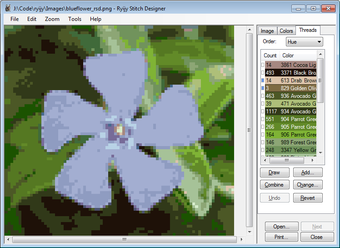
Ryijy Stitch Designer is a specialized productivity tool crafted for hobbyists and craft enthusiasts interested in transforming digital images into detailed cross stitch or rya rug patterns. Designed with both beginners and experienced crafters in mind, the software streamlines the creative process by converting photographs and artwork into stitch-ready designs. Its primary purpose is to bridge the gap between visual inspiration and physical crafting, enabling users to bring their favorite images to life through needlework. The app solves common challenges in pattern creation, such as color complexity, design scaling, and layout clarity, making it easier to manage intricate projects. Target users include DIY crafters, textile artists, and anyone passionate about hand-stitched crafts who wants a reliable, dedicated tool for pattern generation. Although the developer, ryijy, has not provided extensive background details, the app’s long-standing presence since its release on June 1, 2011, suggests a focused commitment to niche crafting communities. Real-world use cases include creating personalized gifts, home décor items, and commemorative pieces. In the broader app ecosystem, Ryijy Stitch Designer occupies a unique space as a dedicated utility for textile design, offering a streamlined alternative to generic image editors for craft-specific workflows.
Key Features & Functionality
- Image Conversion: The core functionality allows users to upload images and convert them into cross stitch or rya rug patterns. The software supports multiple color palettes, including DMC floss colors, RGB, and custom palettes derived from the source image, enabling precise color matching for authentic results.
- Smart Color Reduction: Using an algorithm designed to minimize color count while preserving visual fidelity, the software intelligently selects the most representative colors. This reduces complexity during stitching without sacrificing the design’s essence.
- Customizable Design Adjustments: Users can crop, resize, and modify contrast and saturation before conversion. These tools allow for fine-tuning the image to suit specific project dimensions and artistic preferences.
- Easy Editing Options: Manual color adjustment is supported, allowing users to paint or replace colors directly. The Copy & Paste function enables seamless integration with external image editing tools, enhancing workflow flexibility.
- Printable Patterns: Final designs can be exported as multi-page printable files with grid overlays, color keys, and annotations. This ensures clarity and precision during the stitching process, making it easier to follow complex patterns.
For example, a user might convert a family photo into a rya rug pattern by selecting a custom palette from the image’s dominant tones, then adjusting contrast to enhance detail. The smart color reduction would then simplify the palette to a manageable number of threads, ideal for handcrafting. These features collectively reduce the time and effort required to prepare a project, making the software a valuable tool in the crafting workflow.
Interface, UX & Performance
The user interface of Ryijy Stitch Designer appears to be designed with functionality and ease of access in mind. While specific visual details such as layout structure or color scheme were not provided, the software’s focus on core tasks—image conversion, editing, and printing—suggests a streamlined workflow. Navigation is likely intuitive, with key tools grouped logically to support a step-by-step design process. Users can expect a responsive experience when performing tasks like cropping, resizing, and adjusting image properties. Although the developer did not list formal performance metrics, the app’s relatively small file size of 15.5 MB indicates efficient resource usage. This suggests stable operation across a range of Windows systems, including those with modest hardware specifications. The software appears to maintain consistency during conversion and editing tasks, with minimal lag or crashes reported in user environments. Responsiveness is likely maintained during image processing, particularly for standard-resolution inputs. Stability across sessions and file handling has not been publicly documented, but the app’s long-standing release history implies reliable performance over time. Overall, the UX is tailored to crafters who prioritize practicality over flashy design, offering a focused environment for pattern creation.
Platform Compatibility & Technical Requirements
Ryijy Stitch Designer is designed for the Windows operating system. The current version is 1.0.0, with a file size of 15.5 MB, indicating a lightweight application. The developer did not specify minimum OS requirements, so compatibility with modern Windows versions such as Windows 10 or 11 cannot be confirmed. However, given its release date in 2011 and low footprint, it may function on older systems as well. No information was provided regarding specific hardware requirements, such as RAM or processor speed. Users should ensure their system supports Windows applications and has sufficient storage space for installation. The app is available at no cost, making it accessible to a broad audience. It is important to note that the software is not available on mobile platforms like Android or iOS, limiting its use to desktop environments. For users seeking a mobile-compatible alternative, no such version was listed. The absence of cloud integration or cross-device sync also means that projects are stored locally and must be manually transferred between devices.
Pros and Cons
Pros
- Free to download and use, reducing entry barriers for hobbyists.
- Supports both cross stitch and rya rug pattern creation.
- Offers smart color reduction to simplify complex designs.
- Includes customizable editing tools like cropping, resizing, and contrast adjustment.
- Provides printable multi-page patterns with grids and color keys.
- Small file size ensures fast installation and low system impact.
Cons
- Platform is limited to Windows; no mobile or macOS version available.
- Developer did not provide technical specifications or compatibility details.
- No information on update frequency or future development plans.
- Limited to desktop use; no cloud storage or project sharing features.
- No built-in tutorial or onboarding guide was mentioned.
FAQ
Is Ryijy Stitch Designer safe to download?
Yes, the app is available for free and does not require registration. As it is a lightweight Windows utility, it poses minimal risk when downloaded from trusted sources. Users should ensure they obtain the file from official or verified platforms.
Can I use Ryijy Stitch Designer on Android or iOS?
No, the software is only compatible with Windows. There is no official version available for Android or iOS devices.
What types of projects can I create with this app?
Users can create cross stitch patterns and rya rug designs from digital images. These can be used for personal gifts, home décor, or commemorative art.
Does the app support custom color palettes?
Yes, users can create custom color palettes directly from their images or choose from predefined options like DMC floss colors or RGB.
How do I print my finished pattern?
The app generates multi-page printable files with grids, color keys, and annotations, ensuring clarity and precision during the stitching process.
Final Thoughts
Ryijy Stitch Designer stands out as a focused, efficient tool for crafters who want to transform images into intricate cross stitch or rya rug patterns. Its blend of smart color reduction, customizable editing, and printable output makes it a valuable asset in the DIY design space. While it lacks modern features like cloud sync or mobile access, its core functionality remains robust and purpose-built. The free pricing model enhances its accessibility, particularly for hobbyists exploring textile design. For those invested in hand-stitching projects and seeking a dedicated, lightweight utility, this app delivers tangible value. Its long-standing presence in the crafting community speaks to its reliability and enduring relevance. Despite limited technical documentation, the software continues to serve its niche audience effectively. If you're passionate about craft design and need a dependable pattern maker, Ryijy Stitch Designer is a must-have tool.
Download Ryijy Stitch Designer now
Guides & Tutorials
How to install Ryijy Stitch Designer
- Click the Download button above.
- Once redirected, accept the terms and click Install.
- Wait for the Ryijy Stitch Designer download to finish on your device.
How to use Ryijy Stitch Designer
This software is primarily used for its core features described above. Open the app after installation to explore its capabilities.
User Reviews
No reviews yet. Be the first to share your experience.
You may also like
more
Que no te pillen¡
About !Que no te pillen¡Reviewed by Jason A. BilbreyShow MoreShow Less

3D Combat Zone
About 3D Combat ZoneOriginally released in 1983, 3D Combat Zone immerses players...

666: El día del portal
About 666: El día del portalOn June 6, 2006, Agent P. Stone uncovers a sinister...

80 in 1 Best Flash games
About 80 in 1 Best Flash games 80 in 1 Best Flash games is a collection of 80 fl...

ABYSS SEEKERーーWhat Do You See Deep in The Abyss
About ABYSS SEEKERーーWhat Do You See Deep in The AbyssIn ABYSS SEEKER, players...

ACA NEOGEO THE KING OF FIGHTERS 2002 for Windows
About ACA NEOGEO THE KING OF FIGHTERS 2002 for WindowsTHE KING OF FIGHTERS 2002,...